
Elementor is a powerful drag-and-drop page builder that allows you to design fully custom pages without writing code. Digishift is fully compatible with Elementor and includes custom widgets to help you build your website layouts quickly.
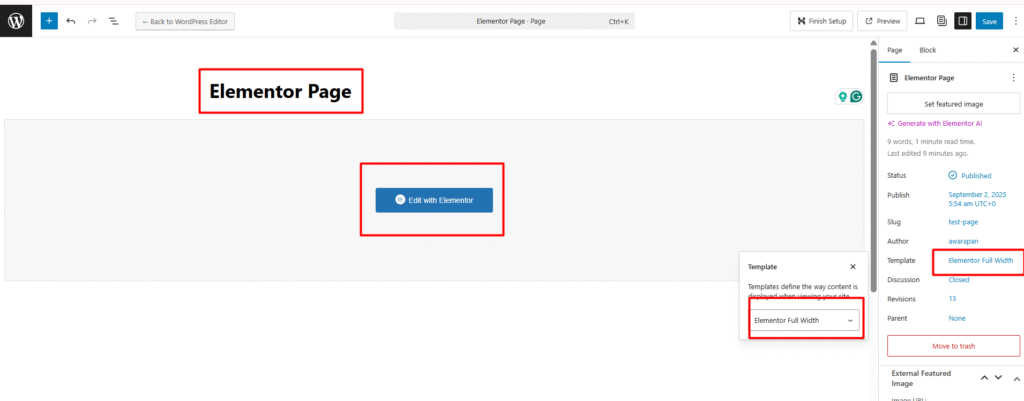
- From the WordPress dashboard, go to Pages → Add New.
- Enter your page title and configure the page options (template, header type etc.) as needed.
- Click the Edit with Elementor button at the top of the editor to launch the Elementor interface.
Designing with Digishift Elementor Widgets #
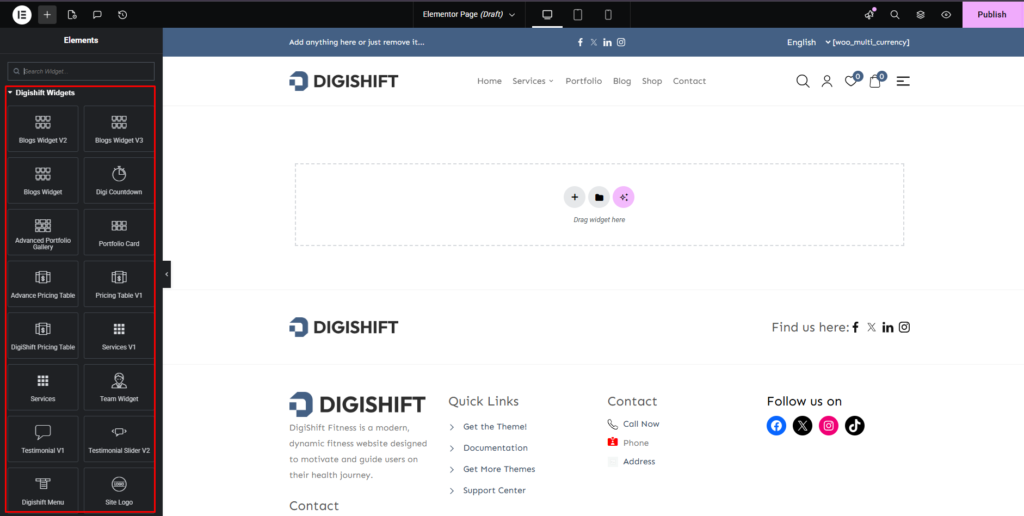
Digishift is a modern multipurpose WordPress theme built to work seamlessly with Elementor Page Builder. With Digishift’s Elementor widgets, you can create highly customizable pages without writing a single line of code. This documentation will guide you through using the built-in widgets to design professional, responsive, and visually appealing websites.
Saving and Publishing #
Once your design is complete: #
- Click Update (or Publish for a new page) inside the Elementor editor.
- If this is your homepage, assign it from Settings → Reading → Your homepage displays → A static page.
Tips: #
- Use the Elementor Full Width template for maximum control over your layout.
- Combine Digishift widgets with Elementor’s native widgets for more design possibilities.
- Always keep Elementor updated to ensure full compatibility


