
The Contact Info widget is specifically designed to display business details, such as address, phone numbers, and email, in a clean, organized list. It is best suited for placement in the Footer Areas (1–4) to provide visitors with easy access to contact information.
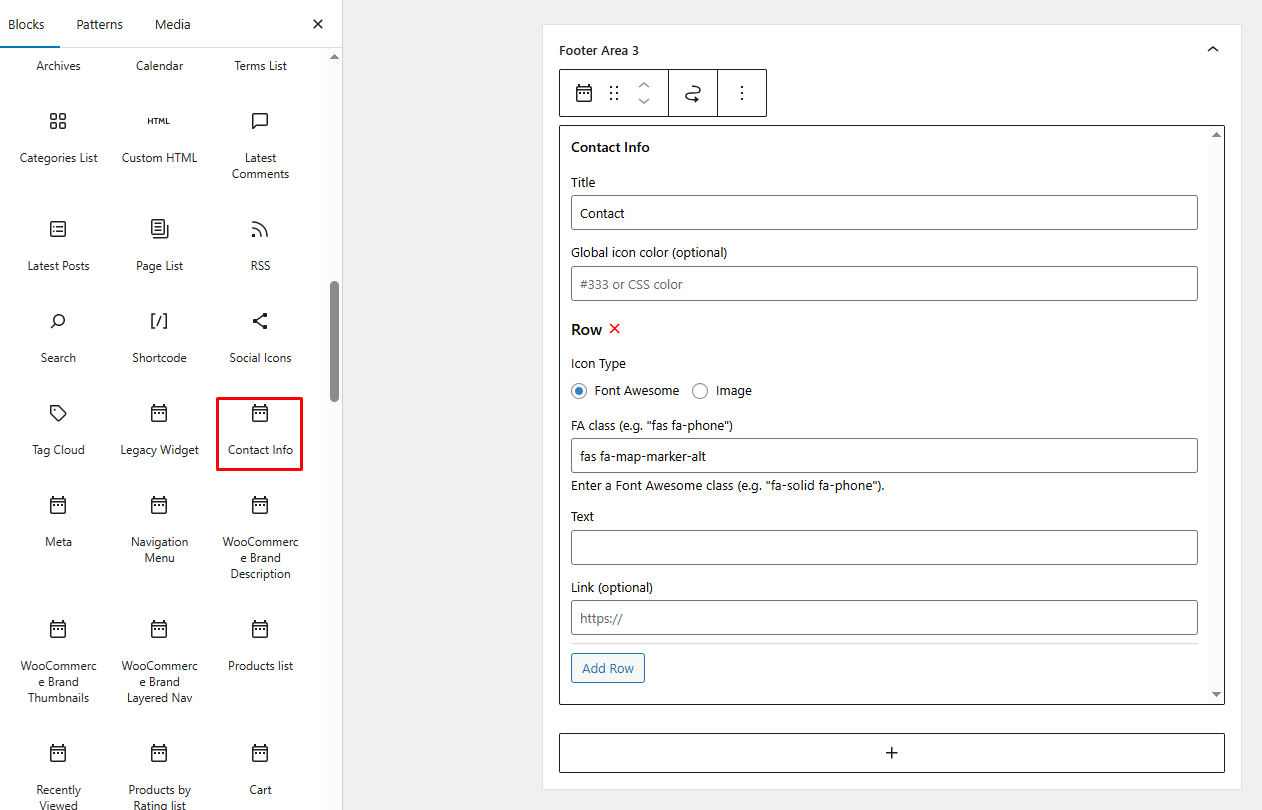
Configuration Options #
When you add the Contact Info widget to a sidebar or footer area, you will have the following customization options:
- Title: Set a main heading for the widget (e.g., “Contact Us”).
- Global Icon Color (optional): Define a custom color for all icons within the widget using a hex code (e.g.,
#333) or a standard CSS color name (e.g., Red, Green).
Repeater Rows: Add multiple pieces of information by clicking the Add Row button. For each row, you can configure
- Icon Type: Choose between using Font Awesome icons or custom images.
- FA Class: If using Font Awesome, enter the specific class for the icon (e.g., “
fas fa-phone“ for a phone icon or “fas fa-map-marker-alt“ for a location pin). - Text: Enter the contact details to be displayed (e.g., your business phone number or physical address).
- Link (optional): Provide a URL if you want the contact text to be clickable (e.g., a
mailto:link for email or a Google Maps link for addresses).
Placement Tip #
[!TIP] To maintain a professional look, we recommend placing this widget in Footer Area 3 or Footer Area 4. This ensures your contact details are visible on every page of your site, helping with user trust and accessibility.


