
The Page Template is a specialized layout option designed for pages that require traditional sidebar configurations (Left, Right, or Full Width). Unlike using a standard Elementor template—which often takes over the entire page area—the Page Template allows you to maintain control over theme-level structures like sidebars and hero sections through dedicated Meta Boxes.
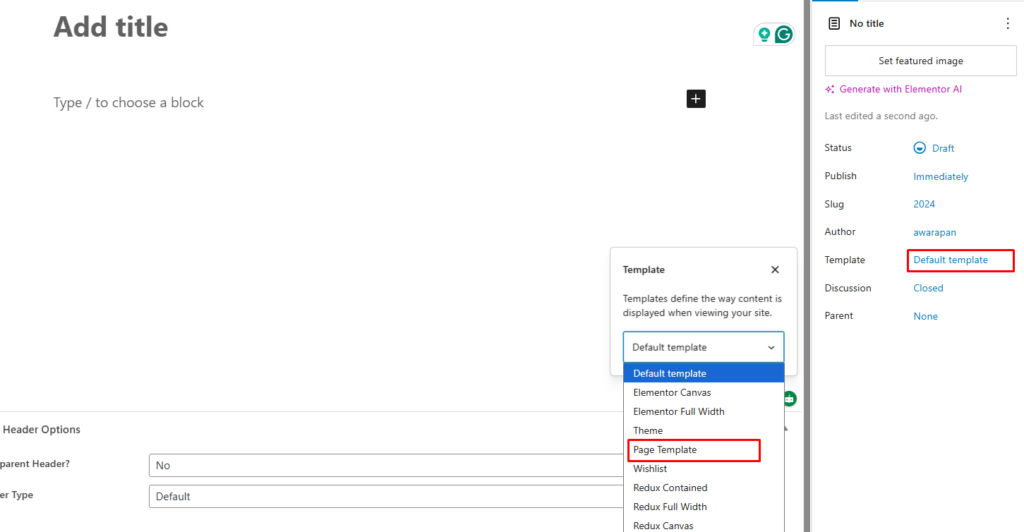
Assign the Page Template #
To enable the specialized sidebar and hero controls, you must first switch the page’s template:
- Access Settings: In the WordPress page editor, go to the Page tab in the right-hand sidebar.
- Select Template: Open the Template dropdown and choose Page Template.
- Update: Save or publish the page to trigger the appearance of the specific Meta Boxes.
Configuring Layout & Sidebars (Meta Boxes) #
Once the Page Template is active, you can manage the layout via the Page Header Options and Page Hero & Styles Meta Box located below the editor. These settings will override any global theme configurations for this specific page.
Sidebar Control #
This is the primary advantage of the Page Template over a standard Elementor Canvas or Elementor full Width Template:
Page Sidebar: Use this dropdown to choose your layout:
- Right Sidebar: Places your designated sidebar on the right.
- Left Sidebar: Places the sidebar on the left.
- No Sidebar (Full Width): Expands the content area to fill the container.
Hero & Header Overrides #
The Meta Boxes allow you to customize the top of the page independently of global settings:
- Transparent Header: Specifically enable or disable header transparency for this layout.
- Page Hero Section: Toggle to Show or Hide the entire top banner area.
- Hero Content Alignment: Set your alignment to Space Between, Center, or Left.
- Page Hero Title: Choose to display the page’s title within the hero section.
- Show Breadcrumb: Toggle the navigation path on or off.
- Page Hero Height: Set a custom height in pixels (e.g., 130px).
- Override Global Style?: If set to Yes, you can manually define the Hero Background Overlay Color, Hero Background Image, and specific Content Styles like title and link colors for this page.
Why use this instead of Elementor Templates? #
[!IMPORTANT] When you design a page as an “Elementor Canvas” or “Full Width” template, the theme’s sidebar logic is typically disabled. The Page Template is the correct choice when you need to use the WordPress Sidebar system while still being able to design the main content area with Elementor.
[!TIP] These Meta Box options only become visible and active once the Wishlist or Page Template is selected in the Template dropdown. If you switch back to the “Default template,” these specific controls will disappear from the editor view.


